Letting Agents Drive Your Interactive Sessions with tmux
Agents are good at writing scripts, but a lot of data science doesn’t happen in scripts - it happens in a live session, often with a big dataset loaded and a model already fit. Because agents default to writing scripts, every run starts cold: the data reloads, and any state you had built up is gone. I’ve recently discovered you can use tmux as a way to close this gap: its send-keys command lets you type into a live session from the outside, which means you can hand an agent the keyboard to your running R or Python session.
This is a shorter post than usual, just a quick trick, but it’s one I think is pretty useful and wanted to share.
To set this up, you just boot an interactive session - R, Python, Julia, anything with a REPL - in tmux. It’s typically a bit easier if you name the tmux session to pass to your agent, and then you direct it to send commands to that session via send-keys. You can (and probably should) extract that out to a skill and pass that to your agent as you work.
Why would I want to do this?
A few reasons:
- The most relevant to me is working with big datasets: you load the data into the session once, and the agent interacts with it in place instead of reloading it on every run. This can dramatically help iteration, especially in the early phases of a data science project.
- I find that this cuts down on the amount of tech debt that accumulates, because the agent pivots from writing one-off disposable scripts to working in a persistent session.
- The agent can inspect live state directly - things like
str(df)ornames(fit)go right in, rather than you relaying state back and forth.
I figured this out after seeing Marimo’s AI notebook pairing feature, wishing there was a similar workflow for R, then accidentally stumbling across this behavior while debugging an issue and connecting some dots.
A Few Tips and Tricks
Redirect Output to a File
One trick to making this work well is to redirect the session’s output to a file and append a unique marker when it finishes. Then the agent watches that file for the marker, rather than trying to watch the tmux session itself. This is more reliable and also transports the whole output into the agent’s context.
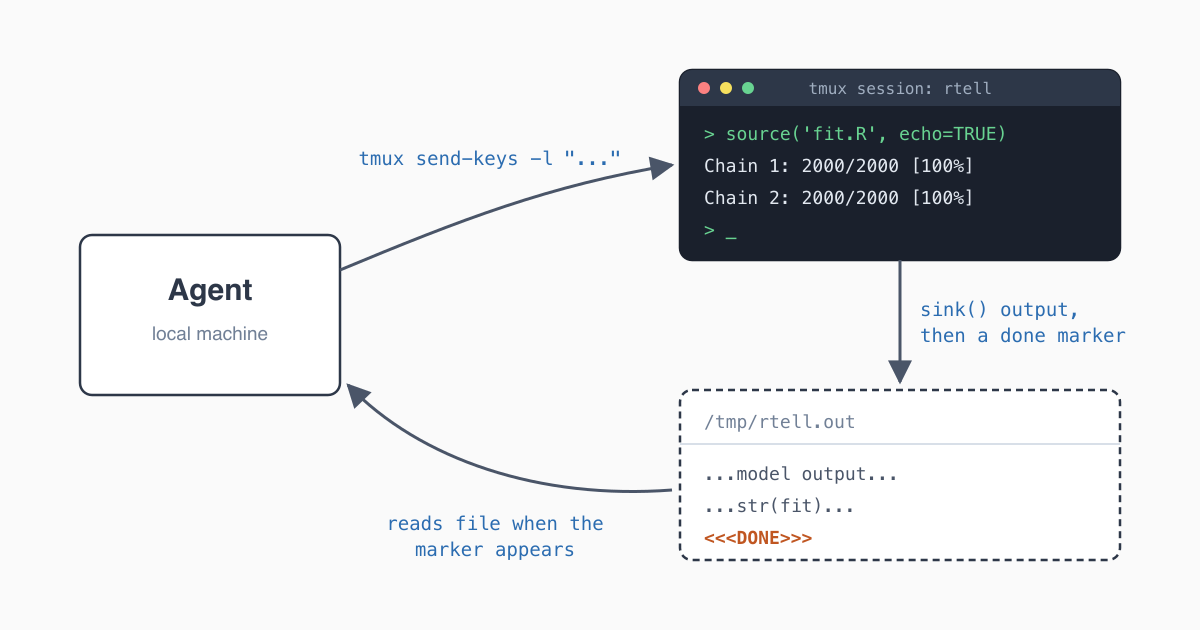
At its core, something like this:
SESSION="rtell"
OUTF="/tmp/rtell.out"

# Wrap the code so R writes its output to a file and marks when it's done.
WRAP="sink('$OUTF'); source('code.R', echo=TRUE); sink(); cat('<<<DONE>>>', file='$OUTF', append=TRUE)"

# -l sends the text literally; Enter is a separate keystroke.
tmux send-keys -t "$SESSION" -l "$WRAP"
tmux send-keys -t "$SESSION" Enter

# Watch the file, not the screen.
until grep -q "<<<DONE>>>" "$OUTF"; do sleep 0.2; done
grep -v "<<<DONE>>>" "$OUTF"
My version of this adds a per-call ID so concurrent calls don’t collide, a timeout, and starts the tmux session if it isn’t already running, but this is the core mechanism.
It doesn’t have to be local
A cool part about this is that it doesn’t even have to be on the same machine. You can issue send-keys to a server or to a kubernetes pod all the same, and it can inject into a session you’re running externally. That means if you have a locally installed agent that you want to interact with a remote machine, but you don’t want to install anything on the remote machine, you can do that.
# local
tmux send-keys -t "$SESSION" -l "$WRAP"

# over ssh
ssh host tmux send-keys -t "$SESSION" -l "$WRAP"

# into a kubernetes pod
kubectl exec POD -- tmux send-keys -t "$SESSION" -l "$WRAP"
Notes and disclaimers
- Your variables aren’t safe. The point of this is to allow an agent to access your session. It will do that. If it decides
dfis what it should call the dataframe, and you already have one of those, it will happily trample that. - Sandbox it. This should be obvious, but you’re letting an agent act on an interactive session. Just like anywhere else, the agent can do whatever it wants, especially if you’re flimsy about permissions. Put appropriate sandboxing up, be smart, don’t let it delete your file system.
tmuxobviously isn’t the only solution.vim-slimeis functionally the same thing, and could be used equivalently, and I’m sure there are other solutions out there.
Conclusion
That’s the whole trick. It’s a simple idea, but I think it’s more ergonomic for much of the data science lifecycle and is a helpful thing to have in your back pocket.
Cite This Post
@misc{burch2026tmux-agent-sessions,
  author       = {Tyler James Burch},
  title        = {Letting Agents Drive Your Interactive Sessions with tmux},
  year         = {2026},
  month        = {July},
  howpublished = {\url{https://tylerjamesburch.com/blog/tooling/tmux-agent-sessions}},
}